Dashboard
The Dashboard is the Caplo home page after sign-in. Open it from the Dashboard tab in the global header, or go to /.
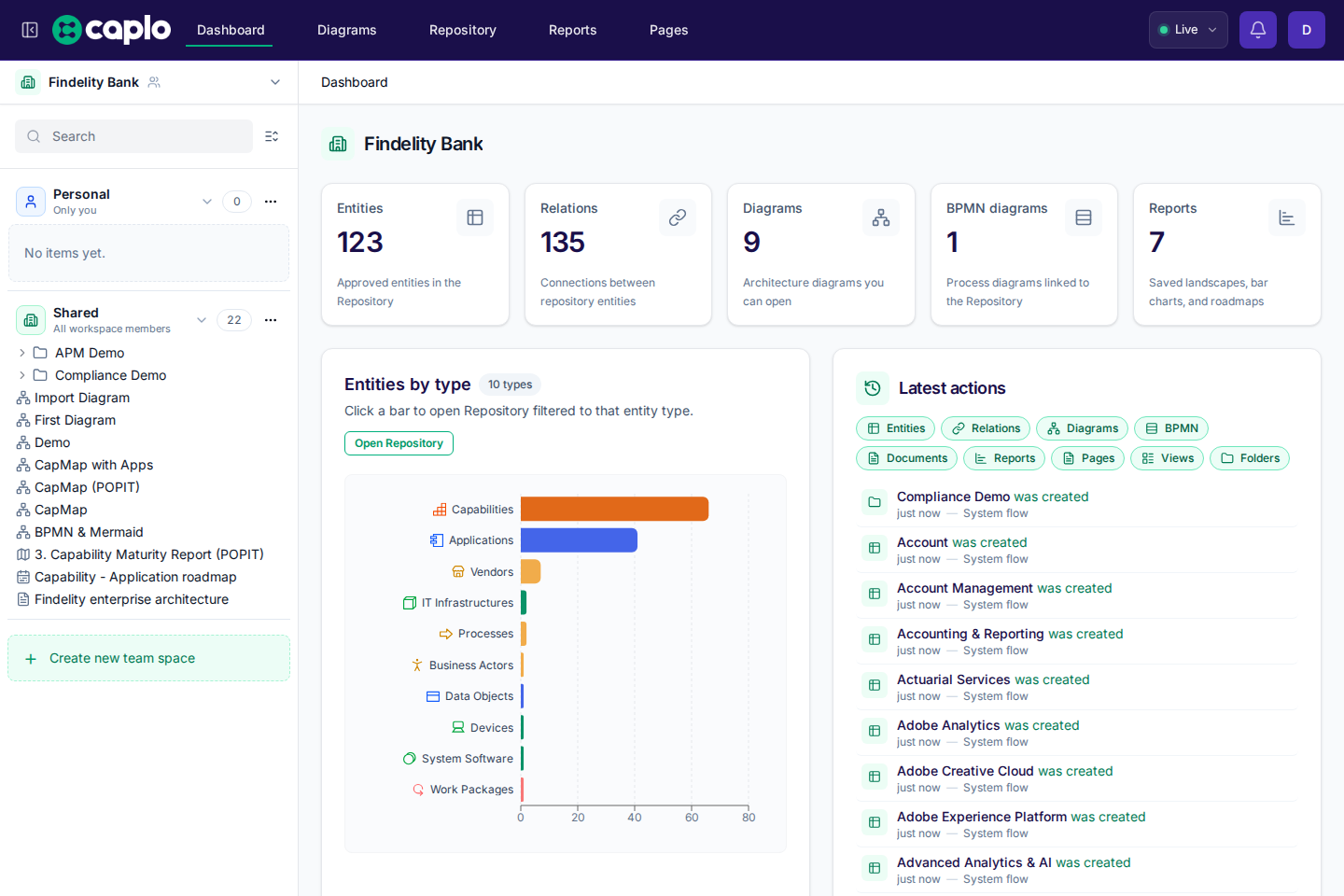
What you see
- Entities — number of approved entities in the Repository
- Relations — number of relations in the workspace
- Diagrams — number of diagrams you can access
- BPMN diagrams — number of BPMN process diagrams
- Reports — number of saved custom report definitions you can access
- Entities by type — a bar chart of approved entities grouped by entity type
- Latest actions — recent creates, updates, and deletes on items you can access. Created, published, and restored are green; updated is amber; deleted is red. Personal items that belong to other people stay in that person's Personal area. Draft edits stay off this list until you are working in that draft, or until you publish — then you see one
{draft name} was publishedrow. Admins can review the full trail in Settings > Audit logs.
Click a bar in Entities by type to open the Repository filtered to that entity type. The filter stays in the URL as ?entityTypes=…, so you can refresh or share the link.
info
The Dashboard currently shows a fixed set of summary tiles and the entity-type chart. Custom widgets and editable layouts are coming soon.