Mermaid and BPMN diagrams
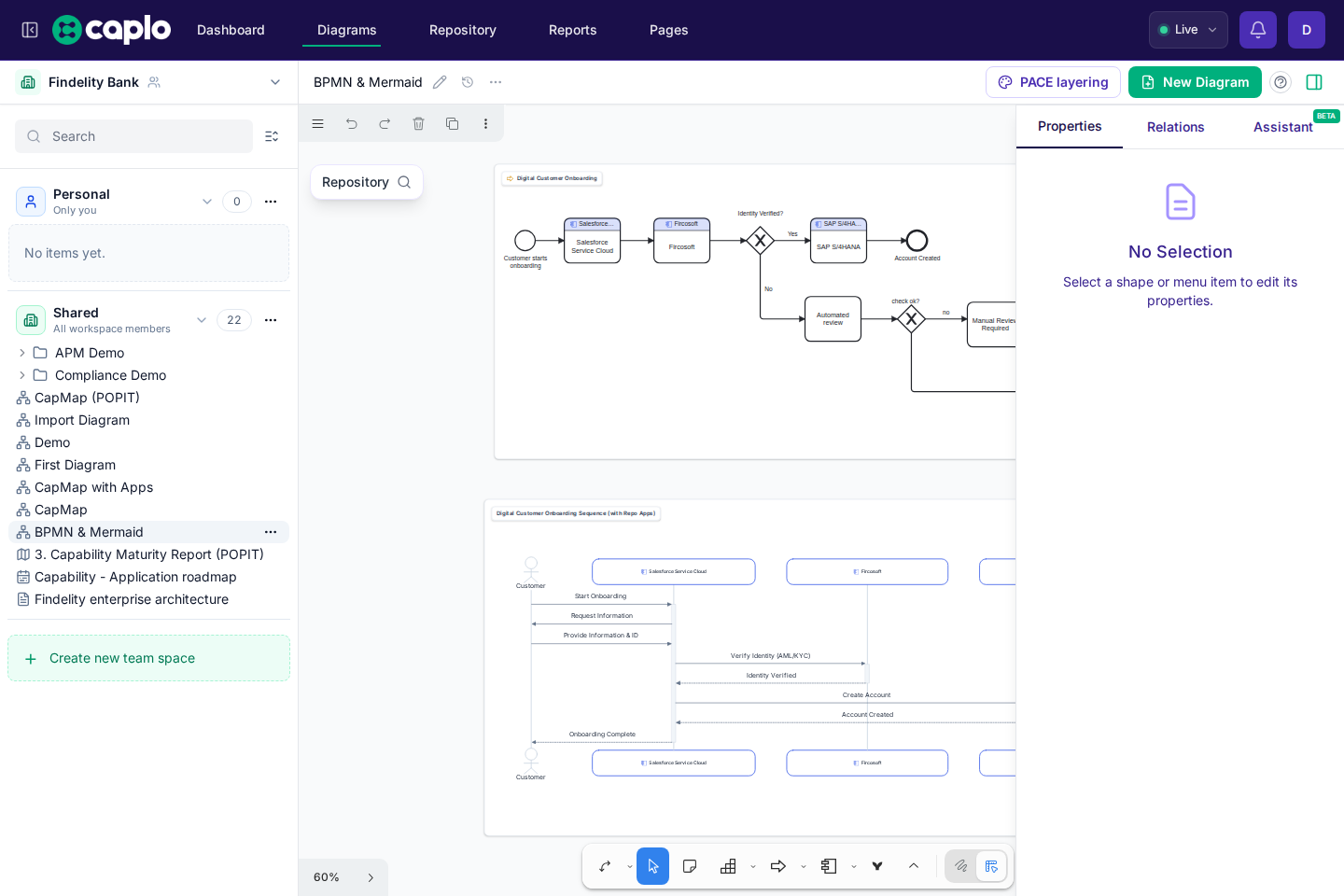
Caplo supports Mermaid and BPMN when text-based or process-specific notation is a better fit than free-form architecture shapes.
Mermaid diagrams
Use Mermaid for compact diagrams that are easier to maintain as text, such as sequence diagrams, ER diagrams, flowcharts, or lightweight dependency views.
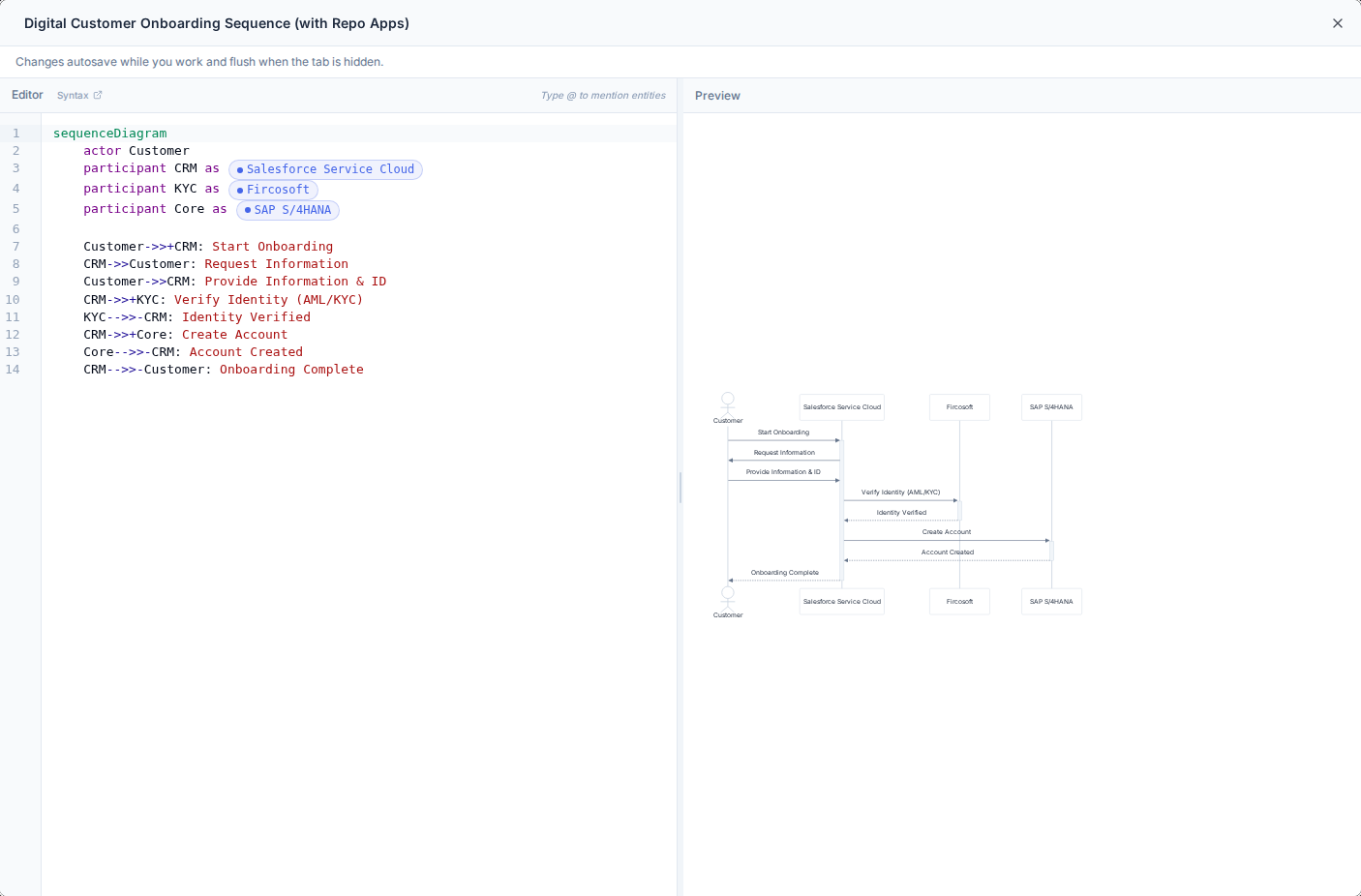
Caplo can render Mermaid syntax broadly, but repository-aware extraction currently focuses on:
- Sequence diagrams
- ER diagrams
That means these two Mermaid styles are the best fit when you want Caplo to recognize referenced repository entities and derive read-only relations from the diagram.
In Caplo, Mermaid is not just a visual diagram format. When Caplo can match Mermaid participants or entities to repository items, the Mermaid relations become part of Caplo's repository-connected analysis model.
That means Mermaid-derived relations can contribute to graph exploration and reporting, even though they remain derived relations instead of normal editable repository relations.
Mermaid examples
Sequence example:
ER example:
In an ER diagram, entity ids stay bare identifiers, and a label with spaces or other non-identifier characters is double-quoted inside brackets, for example SAP["SAP S/4HANA"]. Double quotes, percent signs, and backslashes in that label are written as #34;, #37;, and #92;. The diagram still shows the original characters.
In a sequence diagram, a participant name that contains # or ; is written as participant Id@{"alias":"..."} instead of participant Id as .... Mermaid would otherwise treat # as a comment and stop the label there.
Editing Mermaid in Caplo
Double-click a Mermaid shape to open the full editor. The code editor is on the left and the rendered preview is on the right.
Useful details:
- Use the built-in syntax link in the editor for Mermaid reference material.
- Save the Mermaid editor when you want the diagram, detected entities, and derived relations to update.
Type @ while editing Mermaid to mention existing repository entities directly in the editor. This helps Caplo match the Mermaid diagram to the right repository items.
Derived relations
When Caplo can map Mermaid participants or entities to existing repository items, it derives read-only relations from the Mermaid shape.
These derived relations are:
- visible in Caplo where the diagram is used
- useful for exploration, graph-based analysis, and reporting
- not the same as normal repository relations that you manage directly
This is one of the Caplo-specific advantages of Mermaid support: Mermaid relations do not stay trapped inside the text block. They can influence repository-connected analysis and report traversal as long as Caplo can resolve the referenced entities.
If you want a reusable relation that exists independently from the Mermaid diagram, model it explicitly with linked shapes and relations elsewhere in Caplo.
For general Mermaid syntax, see the Mermaid docs.
BPMN diagrams
Use BPMN for business processes that need process notation with tasks, events, gateways, pools, and lanes.
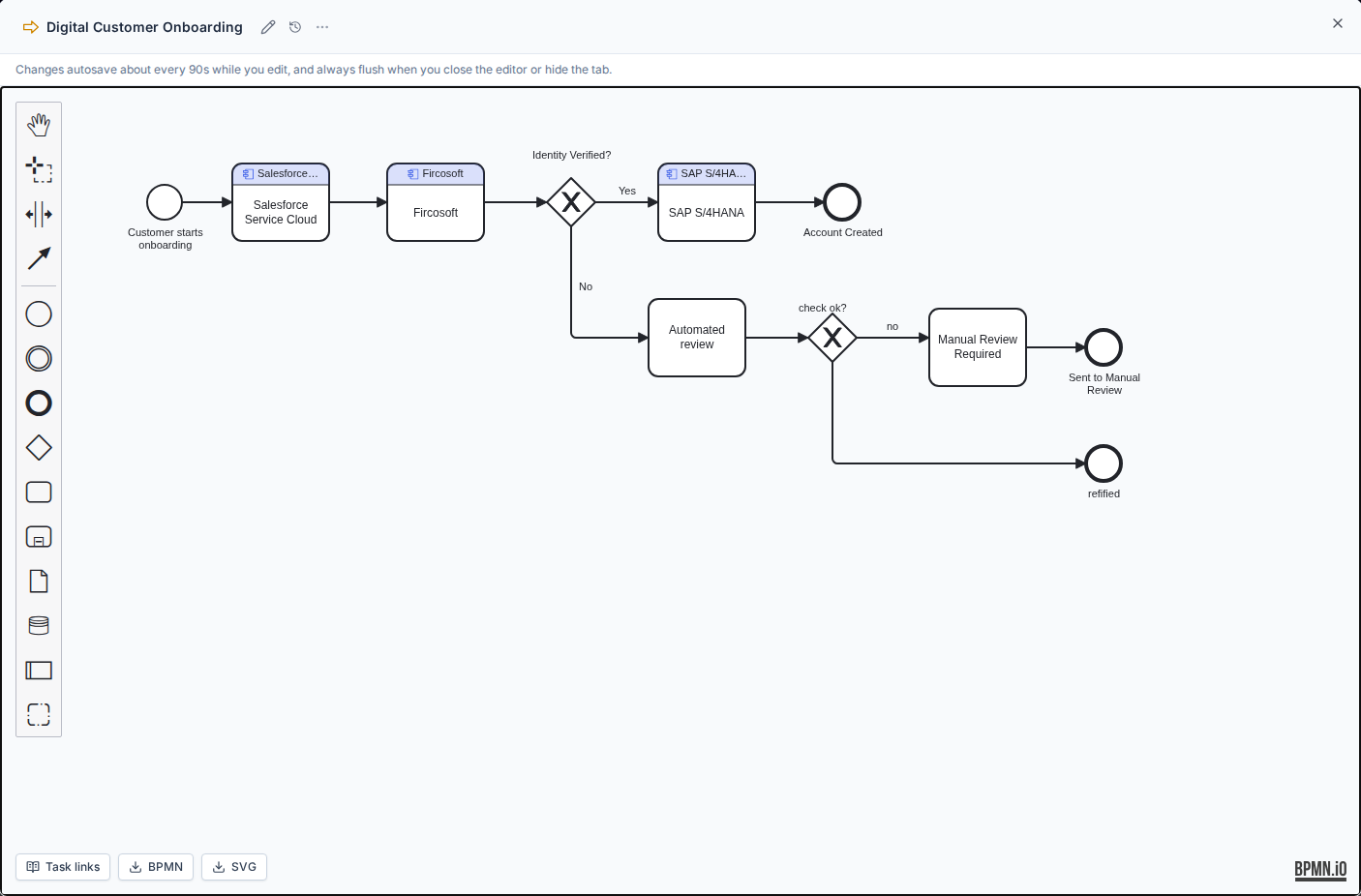
In Caplo, BPMN lives in a full-screen editor backed by a linked Process entity. The BPMN XML and element bindings are stored in the repository as first-class diagram data, keyed directly by that Process entity id; the whiteboard shape is just a lightweight reference that keeps the linked entityId. Double-click a BPMN shape to open the editor, then use the BPMN modeler to draw or refine the process flow.
At the moment, BPMN diagrams are shared workspace content stored on the Process entity. Opening the diagram is still blocked if a linked task, lane, or participant points at an entity you cannot view. Lists can show that the Process has BPMN without letting you load the XML.
Open a Process in the repository to see its BPMN on the BPMN tab. That tab shows the stored diagram and can open the full editor.
The same Process BPMN can also be read and written outside the editor: hosted MCP tools get_bpmn_diagram, persist_bpmn_diagram, and delete_bpmn_diagram, and public REST GET/PUT /api/v1/entities/{id}/bpmn. Those integrations update the repository BPMN for the Process. They do not create or change a canvas shape. MCP get_bpmn_diagram returns a named-element outline of the process unless the caller sets includeCode. MCP persist_bpmn_diagram does not echo the XML. REST GET and PUT still return code. MCP persist/get return a url that opens the Process BPMN tab, including when the write happened inside a draft. The editor Delete action tombstones the live BPMN without deleting the Process; it requires BPMN delete permission and goes through Caplo's Worker. MCP delete_bpmn_diagram tombstones the diagram overlay in a draft and leaves the Process in place. Existing task, lane, and participant bindings stay in place even when the linked entity is unapproved or deleted. Persist unions Caplo entityRef leftovers in the XML, the optional entityBindings / entity_bindings list, and stored links for elements that still exist, so a stripped-XML or empty-list update does not drop those links.
One Process, two representations
In Caplo, a Process can be shown on the canvas in two different ways:
- the classic Process shape, like any other normal architecture shape
- the BPMN shape, when you want to show the internal process flow in BPMN notation
These are two representations of the same linked Process entity, not two separate processes.
That means a linked BPMN shape behaves like a normal Process shape for repository-aware modeling:
- you can draw arrows to and from it
- Caplo can create or reuse normal relations for it
- it still appears as the same Process in diagram references, graph exploration, and reporting
The special thing about the BPMN representation is not a different repository identity. The special thing is that it opens a BPMN editor and lets you model the process flow itself with tasks, events, gateways, pools, and lanes.
In Caplo, BPMN is not just a standalone process diagram. When you link repository entities to BPMN tasks, lanes, or pool participants, Caplo derives read-only relations from those tagged entities to the linked Process.
That means BPMN-derived relations can contribute to graph exploration and reporting, even though they remain derived relations instead of normal editable repository relations.
Editing BPMN in Caplo
Useful details:
- The process name at the top is a read-only label for the linked repository Process. Use Rename next to it to change that Process name. When no Process is linked, type into No process linked: Enter a unique name to create a Process, or pick an existing Process from the suggestions to link it. Suggestions show a BPMN icon after Processes that already have a BPMN diagram; those rows are disabled so their existing diagrams are not overwritten. Rename only changes the current Process name; if that name is taken, Caplo asks you to pick a different name instead of switching Processes.
- A linked BPMN shape still behaves like a normal Process shape on the canvas, so you can use it in relation modeling and arrow drawing the same way.
- The BPMN diagram itself is currently shared repository-backed content, not a private per-user process note.
- BPMN changes autosave about every 90 seconds while you edit, and always flush when you close the editor or hide the tab.
- Closing the editor when the diagram has no real flow content (an empty process or only a start event) asks whether to keep the empty diagram or delete it. The Caplo starter template with a demo task is not empty.
- Use the ... menu in the editor header to Delete the BPMN diagram without deleting the Process. You can restore a deleted diagram from History.
- Open History in the editor header to browse past saves. View opens a read-only preview. Restore writes that XML back onto the live process and updates linked element tags. See History and snapshots.
- BPMN is best for process behavior and handoffs. Reusable enterprise-architecture relations still belong in repository-linked entities and relations.
If you already have a Process on the canvas, you can switch between the classic Process shape and the BPMN representation from the contextual toolbar. This changes the visual representation, not the underlying Process entity.
Link repository entities to BPMN elements
You can tag individual BPMN elements with repository entities:
- Select a task, lane, or pool participant in the BPMN editor.
- Open the context pad and choose the link icon to search for a repository entity.
- Use the unlink icon to clear a tag when needed.
Tagged elements show repository entity styling directly on the diagram, so process steps stay visually connected to applications, actors, data objects, and other repository items. Tagged tasks keep their process-step name in the task body and show the linked entity in a header band above it.
Process entity vs. element tags:
- The diagram header links the whole BPMN shape to one Process entity.
- Element tags connect specific tasks, lanes, or participants to supporting repository entities.
Derived relations
When you tag BPMN elements with repository entities, Caplo derives read-only relations from each tagged entity to the linked Process entity.
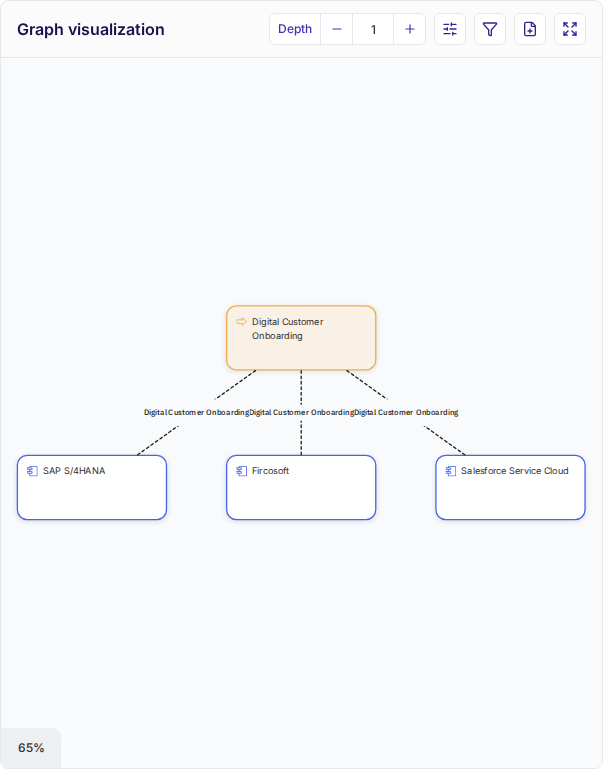
These derived relations are:
- visible in the entity Relations tab and graph explorer
- useful for exploration, graph-based analysis, and relation-path reports
- not the same as normal repository relations that you manage directly
If you want a reusable relation that exists independently from the BPMN diagram, model it explicitly with linked shapes and relations elsewhere in Caplo.
Link BPMN tasks to applications, actors, or data objects from your repository. That makes Process-to-Application paths appear in graph exploration and reporting without redrawing the process elsewhere.
Import BPMN files
You do not need to redraw an existing process from scratch:
- Drop a
.bpmnfile onto the canvas, or - Paste BPMN XML text onto the canvas.
Caplo creates a new BPMN diagram shape, opens the editor, and preserves any Caplo entity bindings already stored in the XML. Invalid BPMN files show an error message.
If your team already has BPMN files from another tool, paste or drop them onto the canvas for the fastest import path.
If your team is new to BPMN notation, the bpmn.io documentation is a good reference for the modeling basics.
Choosing between diagram types
- Use architecture shapes for reusable enterprise architecture objects.
- Use Mermaid for compact text-first diagrams, especially sequence and ER views.
- Use BPMN for process modeling.
- Use Draw mode for early sketches, comments, and visual explanation.
Keep each diagram focused. Mixing styles is useful when it clarifies the story, but it can become hard to read if one canvas tries to do everything.